
Queues, SLA & email
Agent queues, SLA metrics, goals and calendars, breach alerts, the e-mail channel, customer notifications, satisfaction surveys and service desk automation.
Queues
A queue is a saved list of requests for agents — “Unassigned”, “Waiting for customer”, “Breaching soon”. Each row shows the request, its customer, status and the live SLA timers. Open Settings → Queues and press Create queue: give it a Name and a JQL filter (empty shows every request of the desk) plus an ORDER BY, then Save JQL. A new desk comes with sensible queues from its template. The desk page lists them.
SLAs
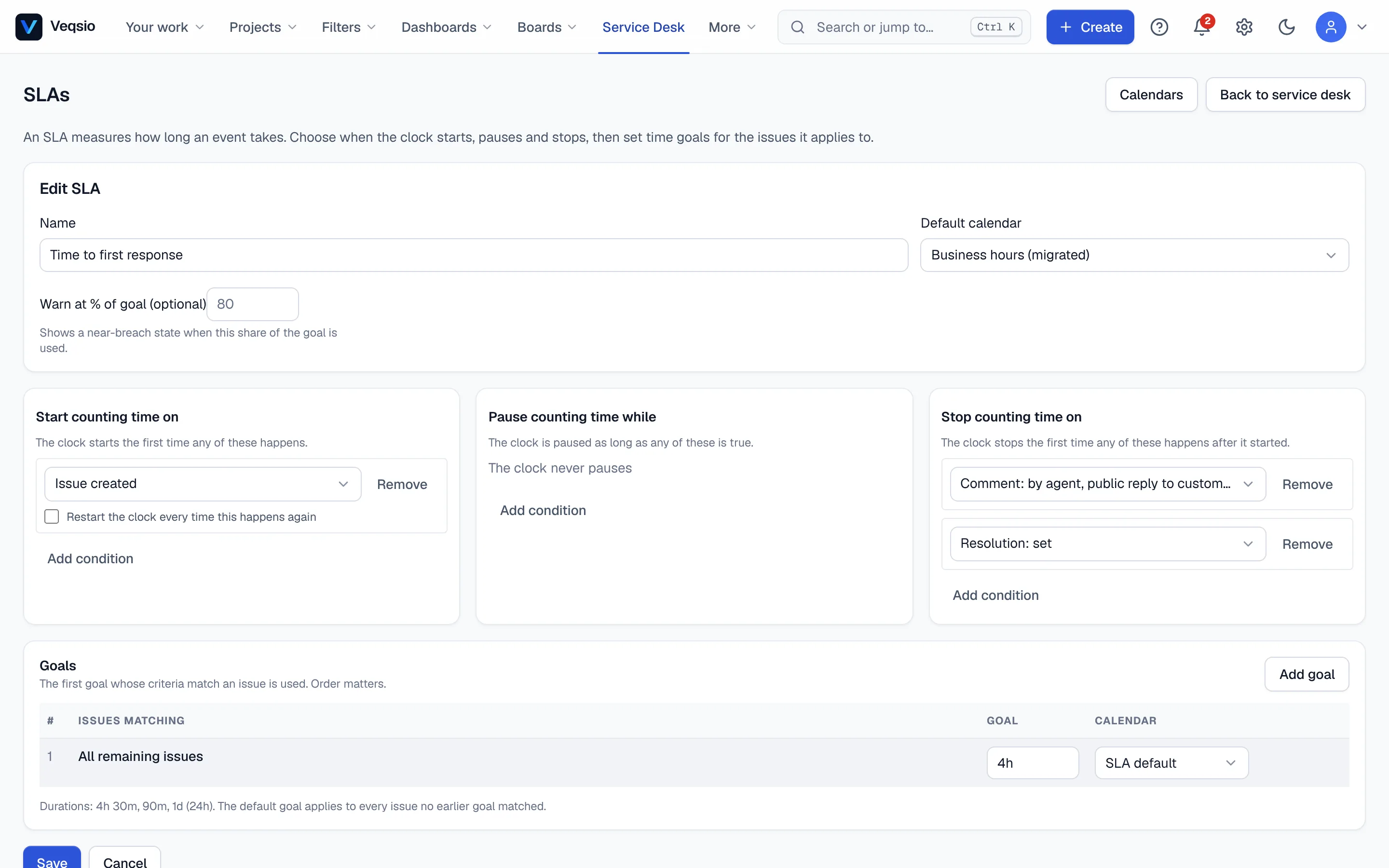
An SLA measures a promise, such as “first response within 4 hours” or “resolve within 3 working days”. Open SLAs on the desk and press Create SLA:
- Name and Time metrics — pick a starting point under Start from, such as “Time to first response” or “Time to resolution”. You describe when the clock starts, pauses and stops using conditions on status, issue type, priority, request type and events.
- Goals — press Add goal: choose which issues the goal applies to (Issues matching conditions on issue type, priority, request type…) and a duration. A final All remaining issues goal catches everything else. The first goal whose criteria match is used, so order matters — use Up/Down to arrange them.
- Calendar — each goal counts time in a calendar. Leave the default or choose another.
- Warn at % (optional) — shows a near breach state once that share of the goal is used.
Agents see SLA badges on the queue and on the issue. A breached SLA sends a breach notification (e-mail and webhook) once per request and SLA.
Calendars
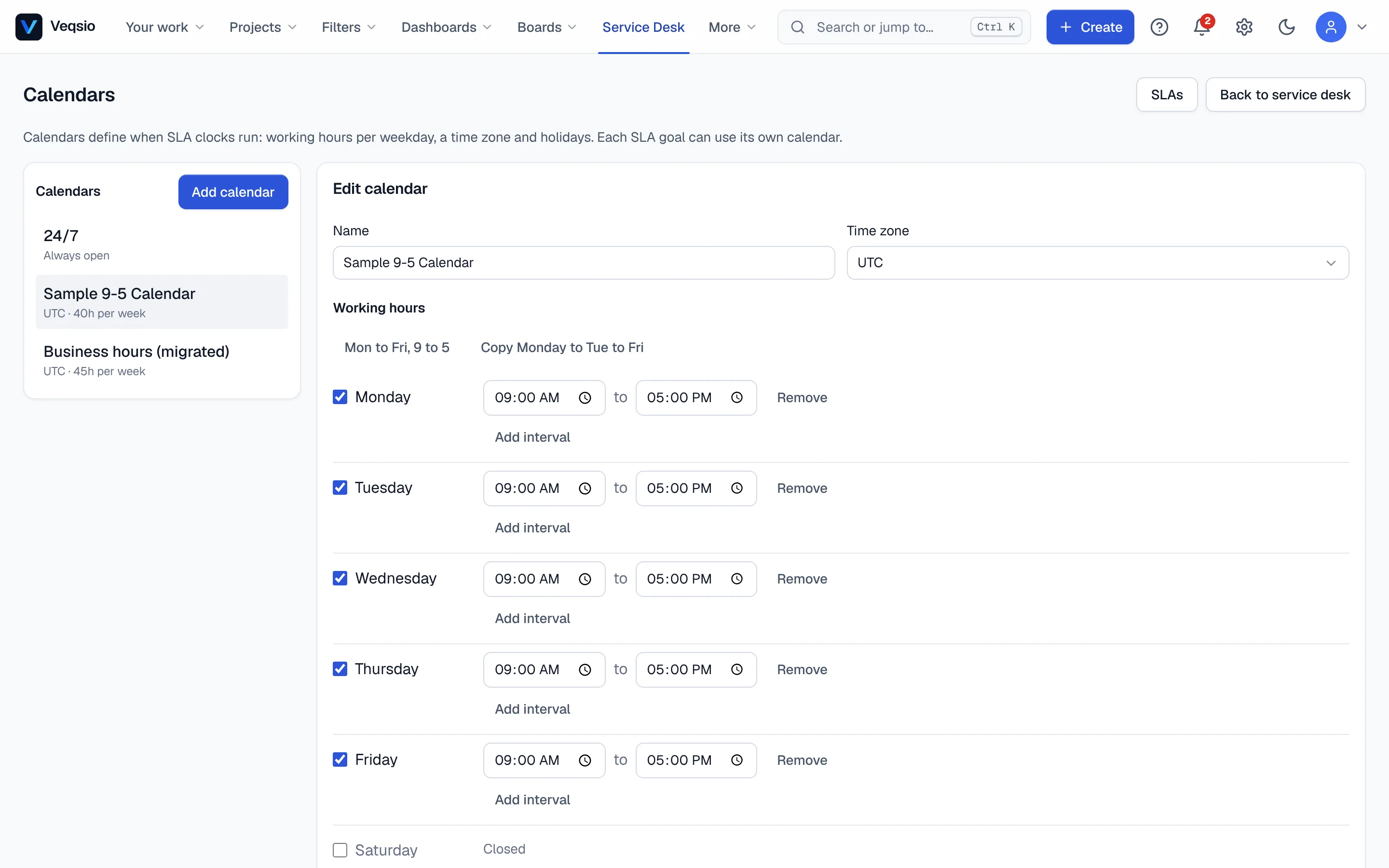
Calendars define working time: a time zone, working hours per weekday and holidays. SLAs only run during working time, so a request raised on Friday evening does not breach over the weekend. A preview shows how a duration plays out; the Legacy (desk business hours) option remains for older desks.
E-mail channel
The E-mail channel lets people create and answer requests by e-mail. A mail gateway (or the built-in mailbox polling) posts incoming messages to a secured address. On the page:
- Accept inbound email — switch the channel on.
- Default request type — the type given to requests created from e-mail.
- Allowed sender domains — comma separated (
example.com, partner.org); empty accepts any domain. - Inbound secret — the gateway must send it in the
X-Veqsio-Inbound-Secretheader. It is shown once when you create or rotate it (copy it now); the page offers an examplecurlcommand to test.
A new e-mail becomes a request; a reply in an existing thread becomes a public comment on it. Only administrators of the desk see this page.
Notifications
Settings → Notifications chooses what goes out: e-mail to the customer on agent replies (when an agent adds a public comment) and on status changes, and the SLA breach alert to agents. Internal notes are never e-mailed to customers.
Customer satisfaction
Customer satisfaction shows the average rating, the trend by week, ratings by agent and by request type, for the last 30, 90, 180 days or year. A follow-up queue lists low ratings; press Mark handled when you have reached out.
Service desk automation
Automation on the desk holds rules that run once per request. A rule has a trigger and an action.
| Trigger | Fires when |
|---|---|
| SLA at x% | an unfinished SLA has used x% (1–99) of its target; optionally one specific SLA |
| SLA breached | an unfinished SLA is past its target |
| Waiting for the customer | a request has been in “Waiting for customer” for n days |
| Customer reply | the customer answers (portal or e-mail) a resolved request |
| New request | a request is created; optionally only if it mentions some words or arrives by a given channel |
| Action | Does |
|---|---|
| Notify | e-mails the assignee, or all desk agents when unassigned |
| Reassign | sets the assignee |
| Change priority | sets the priority |
| Move to a status | performs a workflow transition, with an optional comment — this is how auto-close (after n days waiting) and auto-reopen (on a customer reply) are built |
| Comment | adds a public comment; {{issue.key}} and {{days}} are filled in |
| Add labels / set request type | for new-request rules: automatic categorisation of incoming requests |
Examples: mentions “printer” or “scanner” → add label hardware; arrives by e-mail and mentions “outage” → priority Highest. Rules act as the person who last saved them, a failing action is written to the rule’s run log without stopping other rules, and the check runs every minute. The Insights page shows how often each rule ran and when it last failed.
Waiting time is counted in calendar days, not working hours.